March 18, 2022
Solved

Task does not open at the start/top of the form

  • March 18, 2022
  • 10 replies
  • 0 views

Prereq: Site, tested in Chrome and Edge.

My use case starts in a site as the main user landing point. From here various actions and a pair of reports are presented to the user.

Depending on the user's screen resolution the initial landing page may or may not scroll. Given the user has scrolled down the page, when they click on a task link (from a task report for example) the task opens up within the site framework but is not at the top of the task, instead, the interface retains the previous scrolled to position.

This has been observed where the target form has been constructed in either formLayout or in headerContentLayout constructs.

I cannot find a way to force the vertical page position back to the top of the form.

Can anyone suggest a solution?

Best answer by mikes0011

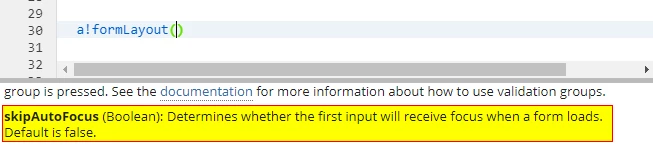
I haven't messed with this recently, but per my best recollection (and also what I believe Harshit was referencing) was the fact that a!formLayout() autofocuses the first input unless you set its "skipAutoFocus" parameter to FALSE.  Have you tried doing this yet?

10 replies

stefanhelzle0001
Brainy
March 18, 2022

This is not something we can control. I suggest to reach out to Appian.

jamesf125Author
March 18, 2022

Thanks Stefan. I will endeavor to post back here with the results.

harshitb6843
March 18, 2022

I think Appian introduced its solution in one of their 21.x versions. I suggest going through the release notes once. If you don't find anything, then as Stefan mentioned, you will have to contact Appian. 

jamesf125Author
March 18, 2022

There is a mention in the 21.2 release notes (21.2 - automatic scrolling for wizards) however this seems to indicate that the focus switches to the top of the form when transitioning in a form wizard use case which would suggest to me that you would either need to be switching between task nodes or within the current interface. This does not meet my requirement.

mikes0011
mikes0011Answer
Brainy
March 18, 2022

I haven't messed with this recently, but per my best recollection (and also what I believe Harshit was referencing) was the fact that a!formLayout() autofocuses the first input unless you set its "skipAutoFocus" parameter to FALSE.  Have you tried doing this yet?

The Expression Guru
jamesf125Author
March 18, 2022

The parameter for setting "skipAutoFocus" is very rarely used in our configurations so in the cases I am examining "formLayout" would be operating under the default of false. 
Also because the task is assigned to a group it needs to be accepted first so all form fields are initially locked out so it looks like the autofocus is being ignored.

mikes0011
Brainy
March 18, 2022

To clarify though, having "skipAutoFocus" defaulting to "FALSE" would mean that such forms are autofocusing the first input field.  As long as you're clear on this then I'm not sure what else to suggest - though if you haven't, i'd still suggest doing an A/B comparison to see whether / how much it affects the use case you're mentioning here.

The Expression Guru
jamesf125Author
March 29, 2022

The following enhancement request has been raised for this use case: #3951 - Scroll position should always be at the top when navigating to new links

If you are experiencing the same issue please contact Appian Support to express your interest.