March 15, 2023
Question

Toggle button

  • March 15, 2023
  • 11 replies
  • 1 view

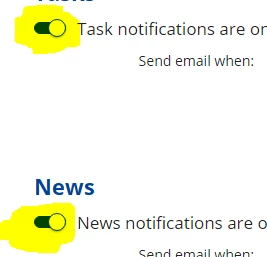
I want to use the toggle button (highlighted below) in my user interface - similar to that used in the Profile Settings --> Email notifications interface.

Is this available anywhere or on the Appmarket?

Thanks!
    11 replies

    mikes0011
    Brainy
    March 15, 2023

    That seems to be one of the components they keep for behind-the-hood use within the Appian UI itself (though in this case i'm not sure why).  However you could definitely build a component that does something similar in functionality (minus any cool animations anyway), using a Rich Text Display Field containing a Rich Text Icon using the "toggle-on" / "toggle-off" icons.

    a!localVariables(
      local!value: "on",
      
      a!richTextDisplayField(
        value: {
          a!richTextItem(
            size: "MEDIUM_PLUS",
            text: {
              a!richTextIcon(
                icon: "toggle-on",
                showWhen: local!value = "on",
                link: a!dynamicLink(
                  saveInto: {
                    a!save(local!value, "off")
                  }
                ),
                linkStyle: "STANDALONE"
              ),
              a!richTextIcon(
                icon: "toggle-off",
                showWhen: local!value = "off",
                link: a!dynamicLink(
                  saveInto: {
                    a!save(local!value, "on")
                  }
                ),
                linkStyle: "STANDALONE"
              )
            }
          )
        }
      )
    )

    The Expression Guru
    March 15, 2023

    ahh perfect - will give it a go - thanks Mike!

    adityag9712
    March 15, 2023

    a!localVariables(
      local!value: true,
      a!richTextDisplayField(
        value: {
          a!richTextItem(
            size: "MEDIUM_PLUS",
            text: {
              a!richTextIcon(
                icon: "toggle-on",
                showWhen: local!value = true,
                link: a!dynamicLink(
                  saveInto: {
                    a!save(local!value, false)
                  }
                ),
                linkStyle: "STANDALONE"
              ),
              a!richTextIcon(
                icon: "toggle-off",
                showWhen: local!value =false,
                link: a!dynamicLink(
                  saveInto: {
                    a!save(local!value,true)
                  }
                ),
                linkStyle: "STANDALONE"
              )
            }
          )
        }
      )
    )

    Hi, you can use Rich Text Display Field containing a Rich Text Icon using the "toggle-on" / "toggle-off" icons. And on links use dynamic link to update the variable value.

    March 15, 2023

    thanks Aditya - will give it a go!

    adityag9712
    March 15, 2023

    Hi, Please up vote as well :) 

    abhayd3663
    March 15, 2023

    Agree with all the comments. It will be lot more easier if Appian comes up with these kind of basic component library.

    mikes0011
    Brainy
    March 15, 2023

    I do enjoy the fact that now in 23.1 we can start assembling our own component libraries.  I already had a half dozen or so, and it's nice to have a central place to organize them now.  However (and not to gripe about a nice new feature) i do find it a bit annoying that the Design Library tab lists every single app package any of the added elements are in... that makes it quite a bit... busy.... on my dev environment.

    The Expression Guru
    Participating Frequently
    September 14, 2023

    a!localVariables(
    local!a:true,
    a!cardLayout(
    contents:{
    a!richTextDisplayField(
    value:a!richTextIcon(
    icon: "toggle-off",
    color:"ACCENT",
    size:"MEDIUM_PLUS",
    link: a!dynamicLink(
    saveInto: a!save(local!a,false)
    ),
    linkStyle: "STANDALONE"
    ),
    showWhen:toboolean(local!a)
    ),
    a!richTextDisplayField(
    value:a!richTextIcon(
    icon: "toggle-on",
    color:"ACCENT",
    size:"MEDIUM_PLUS",
    link: a!dynamicLink(
    saveInto: a!save(local!a,true)
    ),
    linkStyle: "STANDALONE"
    ),
    showWhen:toboolean( local!a)= false
    ),
    }
    )

    )

    use this code for toggle button

    stefanhelzle0001
    Brainy
    September 14, 2023
