
March 14, 2023
Solved

trim() not working

  • March 14, 2023
  • 4 replies
  • 0 views

Hi,

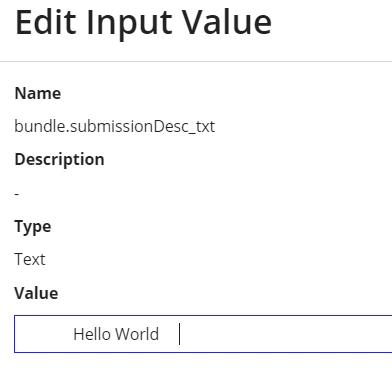
I have text field in an interface and I need to trim the Leading and trailing spaces for the value if there any. So I have used trim() as in below code. I tested by giving some sample text with leading and trailing spaces, trim() has removed all the trailing and leading spaces in the interface. But when I checked the CDT to see how it stored, the spaces are still there and it is carrying forward the same value to next screens also.

Can anyone please help me in resolving this. 


            a!textField(
                    label: "Bundled Submission Description",
                  labelPosition: "ADJACENT",
                  value: trim(ri!bundle.submissionDesc_txt),
                  saveInto: ri!bundle.submissionDesc_txt,
                  required: true,
                  validations: rule!RGRACSLBL_FN_getTextLengthValidationMessage(
                    input_txt: index(
                      ri!bundle,
                      "submissionDesc_txt",
                      {}
                    ),
                    length_int: 100,
                    validationMsg_txt: cons!RGRACSLBL_TEXT_VALIDATION_MSG[16]
                  )
                )
    Best answer by ujjwalr0002

    Hi you are just using the trim function on the value part which is used for displaying the data try to use the function in saveinto

    saveInto:a!save(ri!bundle.submissionDesc_txt, trim(save!value))

    4 replies

    Participating Frequently
    March 14, 2023

    Hi you are just using the trim function on the value part which is used for displaying the data try to use the function in saveinto

    saveInto:a!save(ri!bundle.submissionDesc_txt, trim(save!value))

    March 22, 2023

    Thanks. I met the same problem.  duotrigordle

    stefanhelzle0001
    Brainy
    March 14, 2023

    That's the expected behaviour of the code you share. Using trim() in the value parameter will only modify the text as it is displayed to the user, but not as it is stored. Instead, change your saveInto to

    a!save(target: ri!bundle.submissionDesc_txt, value: trim(save!value))

    This will remove the spaces as the values is stored to the rule input.

    adityag9712
    March 14, 2023

    a!textField(
                        label: "Bundled Submission Description",
                      labelPosition: "ADJACENT",
                      value: trim(ri!bundle.submissionDesc_txt),
                      saveInto: save(
                      ri!bundle.submissionDesc_txt,trim(save!value),
                      required: true,
                      validations: rule!RGRACSLBL_FN_getTextLengthValidationMessage(
                        input_txt: index(
                          ri!bundle,
                          "submissionDesc_txt",
                          {}
                        ),
                        length_int: 100,
                        validationMsg_txt: cons!RGRACSLBL_TEXT_VALIDATION_MSG[16]
                      )
                    )