

miquell290189
October 20, 2025
Question

Unable to validate uploaded Excel file extension in interface

  • October 20, 2025
  • 7 replies
  • 0 views

Hi everyone,

I’m working on an interface where the user needs to upload an Excel file with the .xlsx extension. My goal is to validate the file extension directly in the interface, before enabling the "ACCEPT" button.

In my current setup, I’m using the disabled parameter of the a!buttonWidget() to check two things:

  1. That the variable local!excel is not null or empty.

  2. That the uploaded file name (converted to string) contains the .xlsx extension, which I have defined in a constant (cons!CEDT_CONS_EXTENSIONES_DOCUMENTOS).
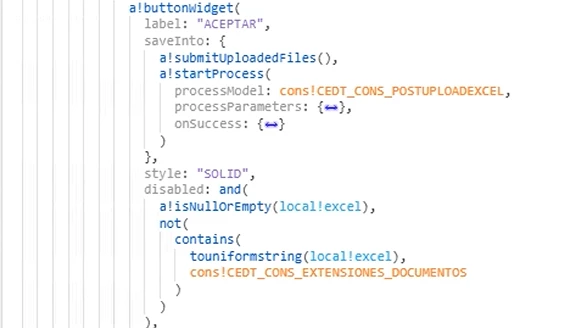
When I use touniformstring(local!excel), it only returns the file ID (a numeric value), not the original file name. Because of that, I can’t compare it with the extension constant to validate the file type.

Here I’m attaching a demonstration of the interface when I upload a file that is not an Excel type. 
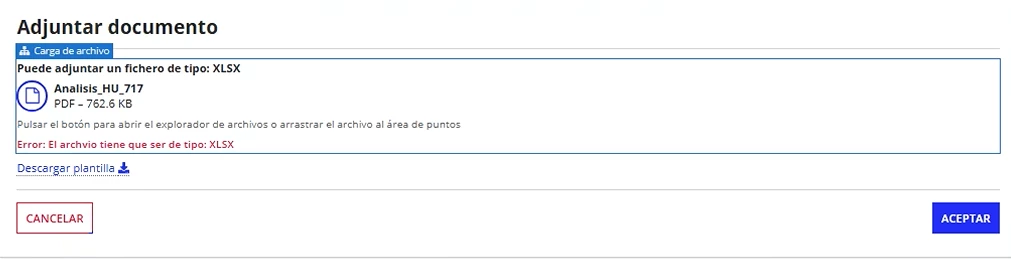
Is there any way to retrieve the original file name (or its extension) from the uploaded file in the interface, so I can perform this validation before enabling the button?
Or is there another recommended approach to handle this kind of validation directly in the interface?

Thanks in advance for your help.

7 replies

stefanhelzle0001
October 20, 2025

Is this a portal page? If not, a!submituploadedfiles() + a!startProcess() will not work.

In general, find a pattern here: https://docs.appian.com/suite/help/25.3/File_Upload_Component.html#all-files-must-be-pdfs

miquell290189
October 20, 2025

No, i'ts a Site, and a!submituploadedfiles() + a!startProcess() are working together correctly. already have a validation in the a!fileUploadField to display a message indicating that the file extension must be .xlsx.

stefanhelzle0001
October 20, 2025

OK, so you try to upload a file outside a process startForm or a user input task. I do not recommend this pattern.

I think the document() function should give you access to file name and extension to do your validation.

shubhama926776
October 20, 2025

Starting from 25.3, you can use the document() function in your interface to retrieve uploaded document metadata including the original file name and extension before submitting the form, allowing direct extension validation in the interface.

docs.appian.com/.../fnc_scripting_document.html

March 25, 2026

Shubham , can we use this document() function to retrive its properties for multiple file in Expression Rule ?? 

so we can use that to show form level validation?? if user tries to submit

stefanhelzle0001
March 25, 2026

Yes

sreekanthb075608
October 20, 2025

You’re correct that touniformstring(local!excel) only returns the document ID and not the file name or extension. The recommended way to retrieve file details is to use the document() function, which works after the file is uploaded and stored as a valid Appian document object.