
January 11, 2023
Solved

Updating grid data when a selected row is changed

  • January 11, 2023
  • 6 replies
  • 0 views

I have a grid (in SAIL) that displays a number of rows.  When one row is selected, the details for that row are displayed below.  Any edits the user makes to the details need to flow back to the grid and be displayed.  This grid is not tied to a record set, but CDT data obtained from other parts of my application.  NOTE:  An editable grid will not work for my scenario.

A greatly simplified version of my need is....

a!localVariables(
  local!data: {
    { name: "Springs", qty: 4, unitCost: 1.27 },
    { name: "Sprockets", qty: 1, unitCost: 2.50 },
    { name: "Gears", qty: 7, unitCost: 1.98 }
  },
  local!selection: null,
  {
    a!sectionLayout(
      label: "Order Summary",
      contents: a!gridField(
        data: local!data,
        columns: {
          a!gridColumn(label: "Qty", value: fv!row.qty),
          a!gridColumn(label: "Item Name", value: fv!row.name),
          a!gridColumn(label: "Unit Cost", value: fv!row.unitCost),
          a!gridColumn(label: "Line Total", value: fv!row.qty * fv!row.unitCost)
        },
        selectable: true,
        selectionstyle: "ROW_HIGHLIGHT",
        selectionSaveInto: {
          a!save(
            local!selection,
            index(fv!selectedRows, length(fv!selectedRows), null)
          )
        }
      )
    ),
    a!sectionLayout(
      label: "Line Item Detail",
      contents: {
        a!textField(
          label: "Item Name",
          value: local!selection.name,
          saveInto: local!selection.name
        ),
        a!textField(
          label: "Quantity",
          value: local!selection.qty,
          saveInto: local!selection.qty
        ),
        a!textField(
          label: "Unit Cost",
          value: local!selection.unitCost,
          saveInto: local!selection.unitCost
        )
      },
      showWhen: not(isnull(local!selection))
    )
  }
)

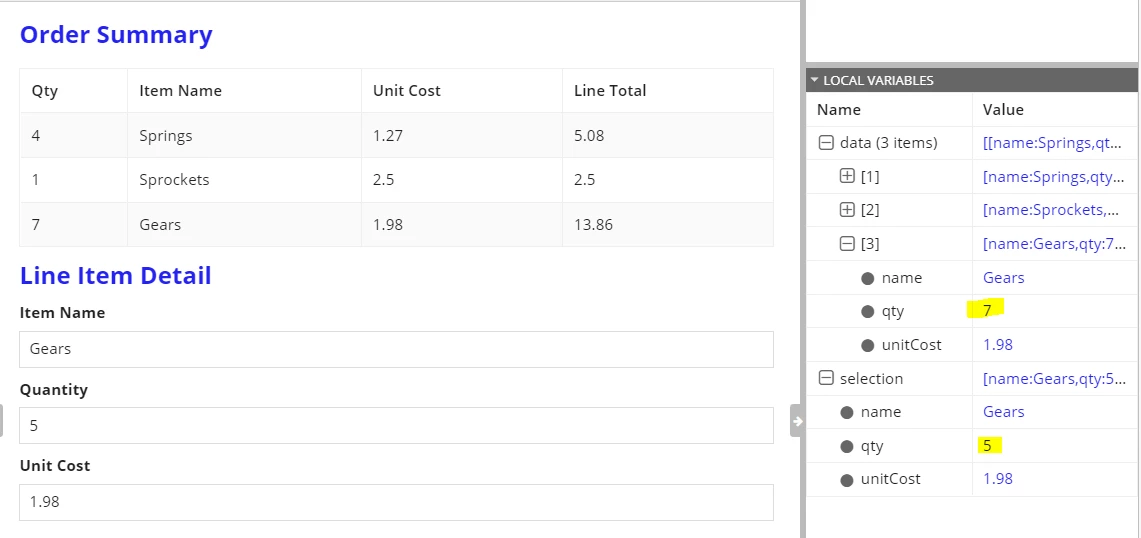
When the data is changed, I see the update in local!selection but how do I get that change back to the grid data source (local!data)?

Best answer by mikes0011

A working example is attached:

a!localVariables(
  local!data: {
    { name: "Springs", qty: 4, unitCost: 1.27 },
    { name: "Sprockets", qty: 1, unitCost: 2.50 },
    { name: "Gears", qty: 7, unitCost: 1.98 }
  },
  local!rowSelected: null(),
  local!selection: null(),
  
  {
    a!sectionLayout(
      label: "Order Summary",
      contents: {
        a!gridField(
          data: local!data,
          columns: {
            a!gridColumn(label: "Qty", value: fv!row.qty),
            a!gridColumn(label: "Item Name", value: fv!row.name),
            a!gridColumn(label: "Unit Cost", value: fv!row.unitCost),
            a!gridColumn(label: "Line Total", value: fv!row.qty * fv!row.unitCost)
          },
          selectable: true,
          selectionstyle: "ROW_HIGHLIGHT",
          selectionValue: local!rowSelected,
          disableRowSelectionWhen: a!isNotNullOrEmpty(local!rowSelected),
          selectionSaveInto: {
            a!save(
              local!rowSelected,
              index(reverse(save!value), 1, null())
            ),
            a!save(
              local!selection,
              index(fv!selectedRows, length(fv!selectedRows), null())
            )
          }
        )
      }
    ),
    a!sectionLayout(
      label: "Line Item Detail",
      contents: {
        a!textField(
          label: "Item Name",
          value: local!selection.name,
          saveInto: local!selection.name
        ),
        a!textField(
          label: "Quantity",
          value: local!selection.qty,
          saveInto: local!selection.qty
        ),
        a!textField(
          label: "Unit Cost",
          value: local!selection.unitCost,
          saveInto: local!selection.unitCost
        ),
        a!buttonLayout(
          primaryButtons: {
            a!buttonWidget(
              label: "Save",
              style: "PRIMARY",
              saveInto: {
                a!save(
                  local!data,
                  a!update(
                    data: local!data,
                    index: local!rowSelected,
                    value: local!selection
                  )
                ),
                a!save(
                  {local!rowSelected, local!selection},
                  null()
                )
              }
            )
          },
          secondaryButtons: {
            a!buttonWidget(
              label: "Cancel",
              style: "SECONDARY",
              saveInto: {
                a!save(
                  {local!rowSelected, local!selection},
                  null()
                )
              }
            )
          }
        )
      },
      showWhen: not(isnull(local!selection))
    )
  }
)

6 replies

mikes0011
Brainy
January 11, 2023

You simply need a "save" button displayed with the editable fields, which saves that data back into the array at the original position you accessed it from.

The Expression Guru
January 11, 2023

I'm not sure what the original position in the data array is.  This data has no primary key.

And I should add that the editable details are actually in a separate interface

rule!XX_SomeDetailInterface(local!selection)

Does any of this change the solution?

mikes0011
Brainy
January 11, 2023

You can store the selected position from the array by "save!value" which, when there's no PK identifier, will save the row number into the save target.

The Expression Guru