
Solved
Upload Attachments Interface Backed By Action
Hello,
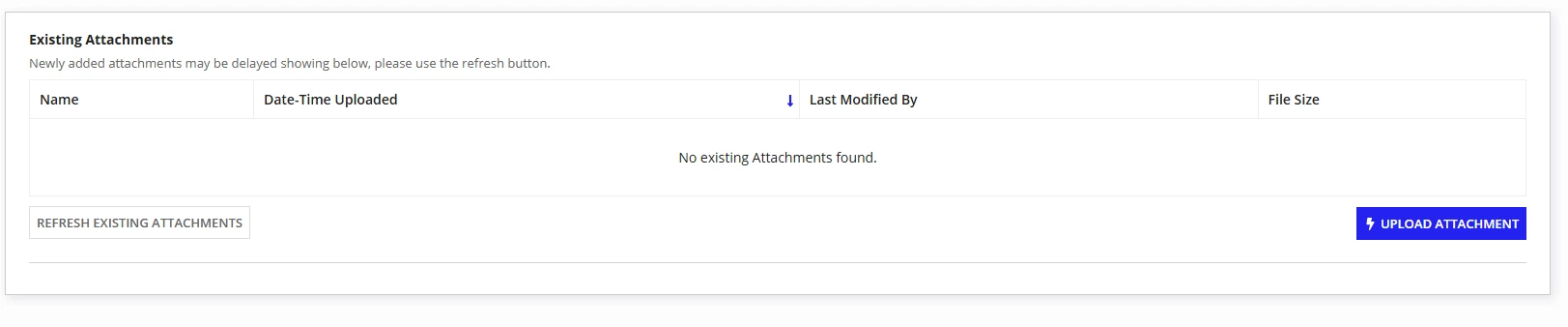
I have this interface where there is a grid that shows uploaded attachments and a button to refresh the grid whenever there is a new attachment uploaded.
I am running into an issue where if the user clicks on "Refresh existing attachments" when the grid is empty, then uploads an attachment, the refresh button no longer refreshes. But if they upload an attachment and click refresh after utilizing the action, it functions as expected and the attachment shows on the grid.
I am trying to cover this scenario in case a user for some reason decides to click refresh before uploading and the grid is empty. Thoughts?
a!localVariables(
  local!readonly: a!isUserMemberOfGroup(loggedInUser(), cons!FRR_viewerGroup),
  local!existingFolderId: if(
    isnull(ri!requestId),
    null,
    rule!FRR_GET_requestFolder(requestId: ri!requestId)
  ),
  local!existingAttachments: a!refreshVariable(
    value: if(
      isnull(local!existingFolderId),
      null,
      folder(
        local!existingFolderId,
        "documentChildren"
      )
    ),
    refreshAfter: "RECORD_ACTION"
  ),
  local!existingAttachmentData:
  a!refreshVariable(
    value:
  a!forEach(
    items: local!existingAttachments,
    expression: {
      /*custom dictionary for document properties*/
      name: document(fv!item, "name"),
      dateCreated: document(fv!item, "dateCreated"),
      lastModifiedBy: left(document(fv!item, "lastUserToModify"), 7),
      size: document(fv!item, "size")
    }
  ),
  refreshafter: "RECORD_ACTION"),
  a!sectionLayout(
    contents: {
      a!columnsLayout(
        columns: {
          /*existing attachment grid*/
          a!columnLayout(
            contents: {
              a!gridField_23r3(
                label: "Existing Attachments",
                instructions: if(local!readonly = true, "", "Newly added attachments may be delayed showing below, please use the refresh button."),
                emptyGridMessage: "No existing Attachments found.",
                data:local!existingAttachmentData,
                columns: {
                  a!gridColumn(
                    label: "Name",
                    sortField: "name",
                    value: a!linkField(
                      links: a!documentDownloadLink(
                        label: fv!row.name,
                        document: local!existingAttachments[fv!identifier]
                      )
                    )
                  ),
                  a!gridColumn(
                    label: "Date-Time Uploaded",
                    sortField: "dateCreated",
                    value: if(
                      isnull(fv!row.dateCreated),
                      "",
                      todatetime(fv!row.dateCreated)
                    )
                  ),
                  a!gridColumn(
                    label: "Last Modified By",
                    sortField: "lastModifiedBy",
                    value: if(
                      a!isNullOrEmpty(tostring(fv!row.lastModifiedBy)),
                      null,
                      rule!FBCO_UsersDetails(tostring(fv!row.lastModifiedBy)).fullname
                    )
                  ),
                  a!gridColumn(
                    label: "File Size",
                    sortField: "size",
                    value: round(todecimal(fv!row.size) / 1024) & " KB"
                  )
                },
                pageSize: 5,
                initialSorts: {
                  a!sortInfo(field: "dateCreated", ascending: false)
                },
                accessibilityText: "Existing Attachments Grid"
              ),
              a!sideBySideLayout(
                items: {
                  a!sideBySideItem(
                    item: a!buttonArrayLayout(
                      buttons: {
                        a!buttonWidget_23r3(
                          label: "Refresh Existing Attachments",
                          style: "SECONDARY",
                          saveInto: {
                            /*reset all the local vars back to load values*/
                            a!save(
                              target: local!existingFolderId,
                              value: if(
                                isnull(ri!requestId),
                                null,
                                rule!FRR_GET_requestFolder(requestId: ri!requestId)
                              ))},
                          size: "SMALL",
                          showWhen: if(local!readonly = true, false, true),
                          width: "MINIMIZE")
                      },
                      align: "START"
                    )
                  ),
                  a!sideBySideItem(
                    item: a!recordActionField(
                      actions: {
                        a!recordActionItem(
                          action: 'recordType!{ad7c4098-9372-49bf-a632-2fb45c59f523}FRR Refund Request.actions.{3ed2a393-a04e-4727-aac0-2e8a930f43ce}uploadAttachment',
                          identifier: ri!requestId
                        )
                      },
                      style: "TOOLBAR_PRIMARY",
                      display: "LABEL_AND_ICON",
                      align: "END",
                      accessibilityText: "Upload Attachment Button"
                    )
                  )
                }
              )
            }
          )
        }
      )
    },
    divider: "BELOW"
  )
)