May 18, 2022
Solved

userinterface: editable grid

  • May 18, 2022
  • 3 replies
  • 0 views

Hi,

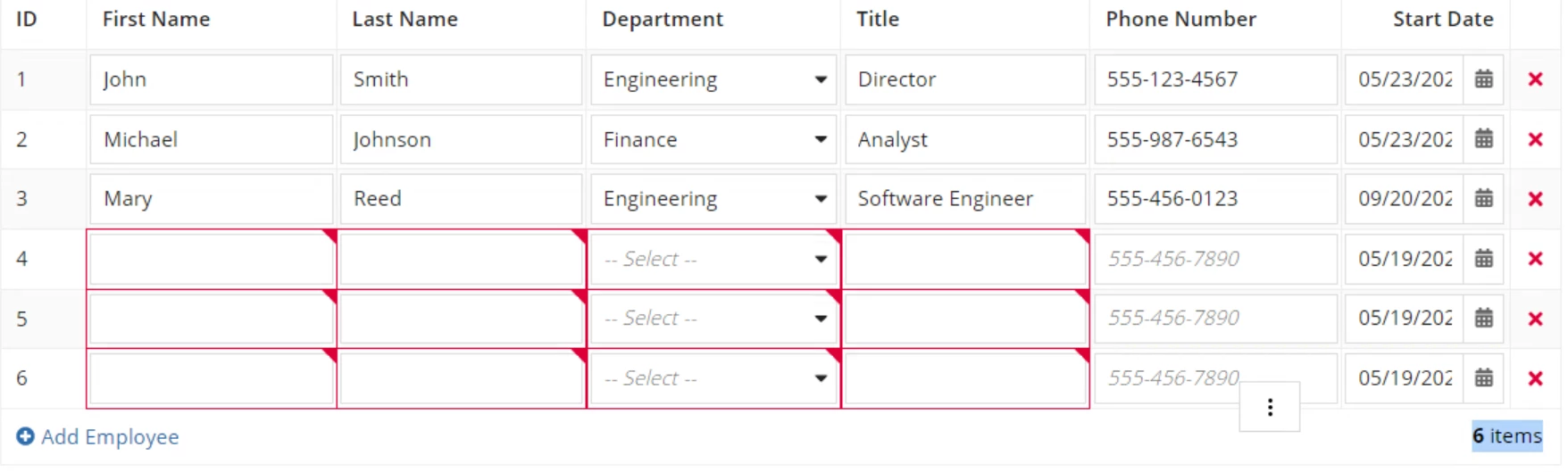
I have an editable grid where I can update the data and add new employees. So far so good.

When we try to click on "Add Employee", we were able to add multiple rows to the grid successfully with proper ID number.

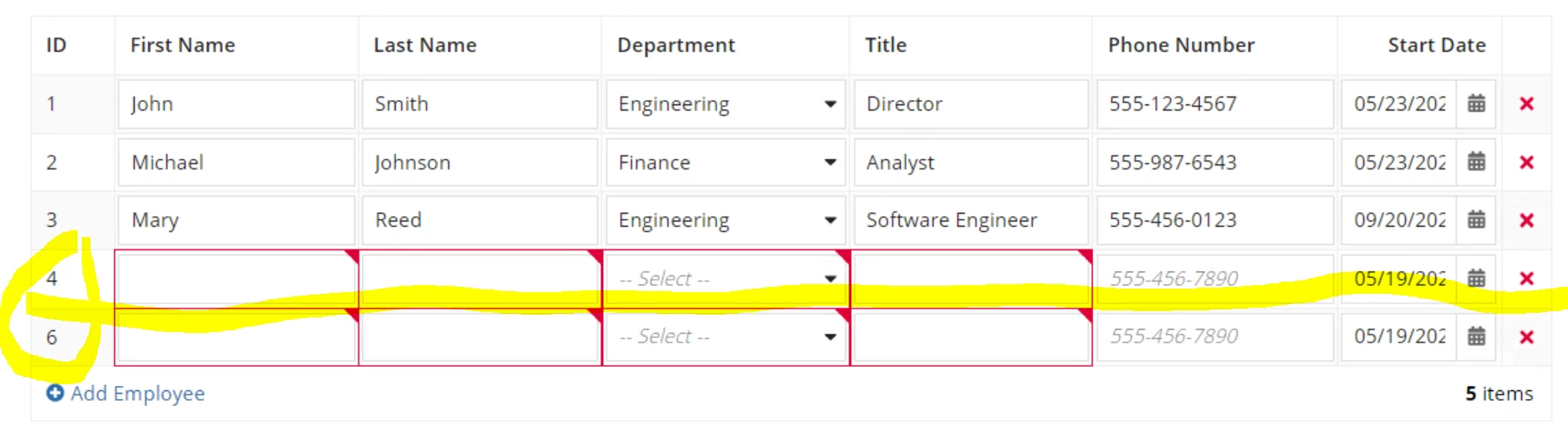
The issue is, by any chance if we delete the middle row(in this case, I have deleted row#5 item) (Image#2), the row number is not re-setting.

Is there away, I can read number or rows in the grid dynamically and show this ID column values dynamically in a sequence.

Best answer by nareshs945

Hi 

You need to pass your current index to get updated index value. Use this sample code to updated your logic.

a!localVariables(
  /*Consider this is your CDT*/
  local!employees: {
    a!map( firstName: "John" , lastName: "Smith" ),
    a!map( firstName: "John" , lastName: "Smith" ),
    a!map( firstName: "John" , lastName: "Smith" )
  },
  a!formLayout(
    label: "Grid",
    contents: {
      a!gridLayout(
        totalCount: count(local!employees),
        headerCells: {
          a!gridLayoutHeaderCell(label: "ID" ),
          a!gridLayoutHeaderCell(label: "First Name" ),
          a!gridLayoutHeaderCell(label: "Last Name" ),
          a!gridLayoutHeaderCell(label: "" )
        },
        /* Only needed when some columns need to be narrow */
        columnConfigs: {
          a!gridLayoutColumnConfig(width: "ICON"),
          a!gridLayoutColumnConfig(width: "DISTRIBUTE"),
          a!gridLayoutColumnConfig(width: "DISTRIBUTE"),
          a!gridLayoutColumnConfig(width: "ICON")
        },
        rows: a!forEach(
          items: local!employees,
          expression: a!gridRowLayout(
            contents: {
              a!textField(
                label: "id" & fv!index,
                value: fv!index,
                readOnly: true
              ),
              a!textField(
                label: "first name " & fv!index,
                value: fv!item.firstName,
                saveInto: fv!item.firstName,
                required: true
              ),
              a!textField(
                label: "last name " & fv!index,
                value: fv!item.lastName,
                saveInto: fv!item.lastName,
                required:true
              ),
              a!richTextDisplayField(
                value: a!richTextIcon(
                  icon: "close",
                  altText: "delete " & fv!index,
                  caption: "Remove " & fv!item.firstName & " " & fv!item.lastName,
                  link: a!dynamicLink(
                    value: fv!index,
                    saveInto: {
                      a!save(local!employees, remove(local!employees, save!value))
                    }
                  ),
                  linkStyle: "STANDALONE",
                  color: "NEGATIVE"
                )
              )
            },
            id: fv!index
          )
        ),
        addRowlink: a!dynamicLink(
          label: "Add Employee",
          value: {
            a!map(
              firstName: null,
              lastName: null
            )
          },
          saveInto: {
            a!save(local!employees, append(local!employees, save!value))
          }
        ),
        rowHeader: 1
      )
    },
    buttons: a!buttonLayout(
      primaryButtons: a!buttonWidget(
        label: "Submit",
        submit: true
      )
    )
  )
)

3 replies

Inspiring
May 18, 2022

Hi 

You need to pass your current index to get updated index value. Use this sample code to updated your logic.

a!localVariables(
  /*Consider this is your CDT*/
  local!employees: {
    a!map( firstName: "John" , lastName: "Smith" ),
    a!map( firstName: "John" , lastName: "Smith" ),
    a!map( firstName: "John" , lastName: "Smith" )
  },
  a!formLayout(
    label: "Grid",
    contents: {
      a!gridLayout(
        totalCount: count(local!employees),
        headerCells: {
          a!gridLayoutHeaderCell(label: "ID" ),
          a!gridLayoutHeaderCell(label: "First Name" ),
          a!gridLayoutHeaderCell(label: "Last Name" ),
          a!gridLayoutHeaderCell(label: "" )
        },
        /* Only needed when some columns need to be narrow */
        columnConfigs: {
          a!gridLayoutColumnConfig(width: "ICON"),
          a!gridLayoutColumnConfig(width: "DISTRIBUTE"),
          a!gridLayoutColumnConfig(width: "DISTRIBUTE"),
          a!gridLayoutColumnConfig(width: "ICON")
        },
        rows: a!forEach(
          items: local!employees,
          expression: a!gridRowLayout(
            contents: {
              a!textField(
                label: "id" & fv!index,
                value: fv!index,
                readOnly: true
              ),
              a!textField(
                label: "first name " & fv!index,
                value: fv!item.firstName,
                saveInto: fv!item.firstName,
                required: true
              ),
              a!textField(
                label: "last name " & fv!index,
                value: fv!item.lastName,
                saveInto: fv!item.lastName,
                required:true
              ),
              a!richTextDisplayField(
                value: a!richTextIcon(
                  icon: "close",
                  altText: "delete " & fv!index,
                  caption: "Remove " & fv!item.firstName & " " & fv!item.lastName,
                  link: a!dynamicLink(
                    value: fv!index,
                    saveInto: {
                      a!save(local!employees, remove(local!employees, save!value))
                    }
                  ),
                  linkStyle: "STANDALONE",
                  color: "NEGATIVE"
                )
              )
            },
            id: fv!index
          )
        ),
        addRowlink: a!dynamicLink(
          label: "Add Employee",
          value: {
            a!map(
              firstName: null,
              lastName: null
            )
          },
          saveInto: {
            a!save(local!employees, append(local!employees, save!value))
          }
        ),
        rowHeader: 1
      )
    },
    buttons: a!buttonLayout(
      primaryButtons: a!buttonWidget(
        label: "Submit",
        submit: true
      )
    )
  )
)
hari0002Author
May 18, 2022

Thanks for your suggested answer.

I have also got one another quick question.

Is there away I can provide "delete" icon only for the row which I have added using "Add Employee" link. I don't want to provide "delete" icon for the existing/default loaded rows.

Thanks.

Inspiring
May 18, 2022

Yes , You need to add show when logic to your richtext icon by checking if there is any id exist for that row or not.

you can see the below code.

a!localVariables(
  /*Consider this is your CDT*/
  local!employees: {
    a!map( id: 1, firstName: "John" , lastName: "Smith" ),
    a!map( id: 2, firstName: "John" , lastName: "Smith" ),
    a!map( id: 3, firstName: "John" , lastName: "Smith" )
  },
  a!formLayout(
    label: "Grid",
    contents: {
      a!gridLayout(
        totalCount: count(local!employees),
        headerCells: {
          a!gridLayoutHeaderCell(label: "ID" ),
          a!gridLayoutHeaderCell(label: "First Name" ),
          a!gridLayoutHeaderCell(label: "Last Name" ),
          a!gridLayoutHeaderCell(label: "" )
        },
        /* Only needed when some columns need to be narrow */
        columnConfigs: {
          a!gridLayoutColumnConfig(width: "ICON"),
          a!gridLayoutColumnConfig(width: "DISTRIBUTE"),
          a!gridLayoutColumnConfig(width: "DISTRIBUTE"),
          a!gridLayoutColumnConfig(width: "ICON")
        },
        rows: a!forEach(
          items: local!employees,
          expression: a!gridRowLayout(
            contents: {
              a!textField(
                label: "id" & fv!index,
                value: fv!index,
                readOnly: true
              ),
              a!textField(
                label: "first name " & fv!index,
                value: fv!item.firstName,
                saveInto: fv!item.firstName,
                required: true
              ),
              a!textField(
                label: "last name " & fv!index,
                value: fv!item.lastName,
                saveInto: fv!item.lastName,
                required:true
              ),
              a!richTextDisplayField(
                value: a!richTextIcon(
                  showWhen: a!isNullOrEmpty(fv!item.id),
                  icon: "close",
                  altText: "delete " & fv!index,
                  caption: "Remove " & fv!item.firstName & " " & fv!item.lastName,
                  link: a!dynamicLink(
                    value: fv!index,
                    saveInto: {
                      a!save(local!employees, remove(local!employees, save!value))
                    }
                  ),
                  linkStyle: "STANDALONE",
                  color: "NEGATIVE"
                )
              )
            },
            id: fv!index
          )
        ),
        addRowlink: a!dynamicLink(
          label: "Add Employee",
          value: {
            a!map(
              firstName: null,
              lastName: null
            )
          },
          saveInto: {
            a!save(local!employees, append(local!employees, save!value))
          }
        ),
        rowHeader: 1
      )
    },
    buttons: a!buttonLayout(
      primaryButtons: a!buttonWidget(
        label: "Submit",
        submit: true
      )
    )
  )
)