
September 11, 2025
Solved

validateAfter: "SUBMIT" is not working

  • September 11, 2025
  • 4 replies
  • 0 views

Appian is evaluating validation before I submit, even though the parameter is set.

              a!validationMessage(
                message: "Field is Required",
                validateAfter: "SUBMIT",
                showWhen: a!isNullOrEmpty(
                  rule!_process_CurrencySanitizer(a!defaultValue(ri!value, null))
                )
              )
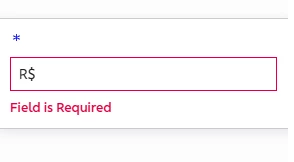
Why is Appian behaving like that? It should be expecting my submit.

Best answer by mikes0011

As Stefan implied, a!validationMessage() is only valid in context of Form or Section components.

for a text field, if you want it to be required and for that to be evaluated at sumbit time, the standard "required" and "requiredMessage" parameters should be sufficient.

4 replies

shubhama926776
September 12, 2025

Component looks to be textField and are you sure you are using a!validationMessage() on textField?
This does not support.
[mention:66e7f986653d4e6ba7ac15249a9a5776:e9ed411860ed4f2ba0265705b8793d05] 

September 13, 2025

Please share whole code snipped.

stefanhelzle0001
September 15, 2025

Test fields do not support a!validationMessage().

mikes0011
mikes0011Answer
Brainy
September 15, 2025

As Stefan implied, a!validationMessage() is only valid in context of Form or Section components.

for a text field, if you want it to be required and for that to be evaluated at sumbit time, the standard "required" and "requiredMessage" parameters should be sufficient.