
Validation error in an interface editable grid field comparing with another record
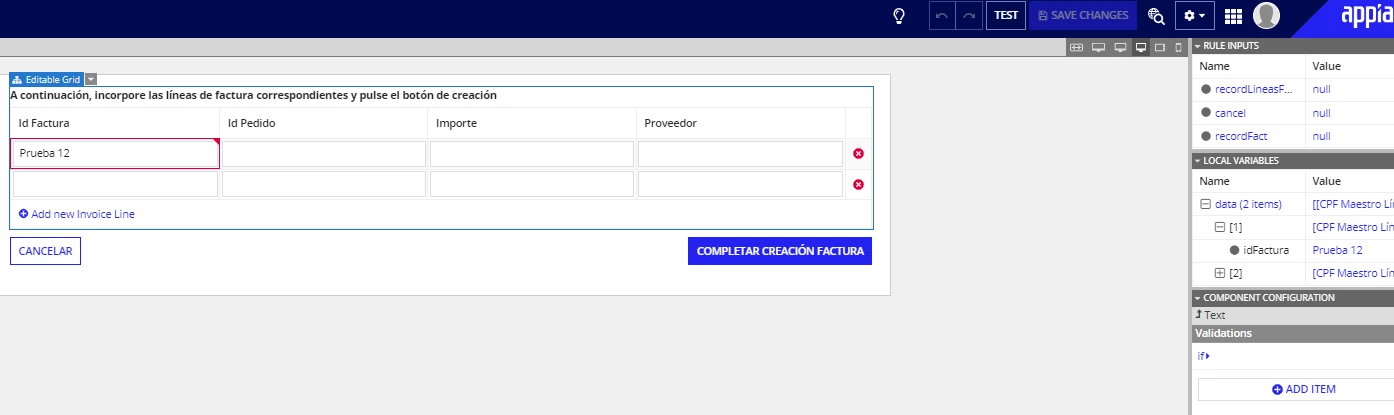
Hi! I have created an editable grid so the user can add new rows and fields manually (invoice lines). My next step is to make a validation to assure the fields match with fields in another previous interface (invoice header). The validation runs OK if I put an static condition (f.e. = "Prueba 1") but I have trouble when linking to a previous record field (the relationship between records is created and runs OK). Even though the first input of the previous record and the second input (actual interface) are the same, Appian recognize it as they are different values. The code I´m using for the validation is the following:
validations: {
                    if(fv!item['recordType!{b83ae990-aa66-4847-b974-1e1e40019294}CPF Maestro LÃ%ADneas Factura.fields.{14eaacbb-19fc-41e2-aea2-3ec9b3322722}idFactura'] = ri!recordLineasFact['recordType!{b83ae990-aa66-4847-b974-1e1e40019294}CPF Maestro LÃ%ADneas Factura.relationships.{fca16b27-3afd-4932-a545-53d4160413d1}maestroFacturas.fields.{6f993c32-7f64-424a-859f-d779194c4a18}id_factura'], "", "El Id de la factura debe ser igual al de la cabecera")
                  })
I don´t know if the problem is to link a fv!item with an ri!record
What would be the steps to compare a user-input value of the editable grid with a previous record value? (user input in a previous interface and uploaded to a record)
Thank you so much, any help or comment would be useful for me.