
Solved
What you see is not what you get. Download does not match screen.
I have an odd problem. I have a read only grid what shows a value one way on the interface, but differently in the excel download.
Here is what you see in the interface vs the excel spreadsheet.
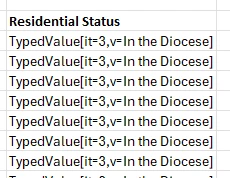
Here is the offending code in the Grid.
a!gridColumn(
 label: "Residential Status",
 value: rule!CMS_GetCurrentResidentialStatusId(fv!row['recordType!CMS Clergy Member Status Report.fields.clergyId'])
),
Here is the expression rule.
a!localVariables(
  /*
   * Get list of current resendential type addresses for clergy member
   * ordered by start date
   */
  local!residentialAddressData: a!queryEntity(
    entity: cons!CMS_ADDRESS_CLERGY_ASSIGNED_ADDRESS,
    query: a!query(
      selection: a!querySelection(
        columns: {
          a!queryColumn(
            field: "clergyAddress.residentialStatus.status"
          )
        }
      ),
      logicalExpression: a!queryLogicalExpression(
        operator: "AND",
        logicalExpressions: {
          a!queryLogicalExpression(
            operator: "AND",
            filters: {
              a!queryFilter(
                field: "clergyId",
                operator: "=",
                value: ri!clergyMemberId
              ),
              a!queryFilter(
                field: "clergyAddress.addressType.addressType",
                operator: "in",
                value: { "Home", "Rectory" }
              ),
              a!queryFilter(
                field: "clergyAddressStart",
                operator: "<=",
                value: todate(now())
              )
            }
          ),
          a!queryLogicalExpression(
            operator: "OR",
            filters: {
              a!queryFilter(
                field: "clergyAddressEnd",
                operator: "is null"
              ),
              a!queryFilter(
                field: "clergyAddressEnd",
                operator: ">",
                value: todate(now())
              )
            }
          )
        }
      ),
      pagingInfo: a!pagingInfo(
        startIndex: 1,
        batchSize: - 1,
        sort: a!sortInfo(
          field: "clergyAddressStart",
          ascending: false
        )
      )
    )
  ).data,
  if(
    count(local!residentialAddressData) > 0,
    local!residentialAddressData[1].clergyAddress.residentialStatus.status,
    null
  )
)
Here is what the expression rule returns.