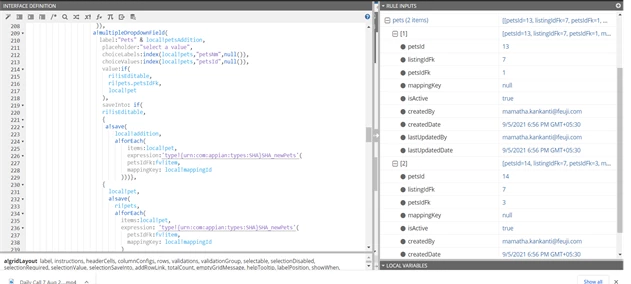
Question
without changing the rule input values how to update rule input by using local variables
Hi,
i am using multidrop down field , i want to update my new values into local variable first then i want to update into my rule input without effecting the rule input values when it is in editable condition and i have tried using the local variable but it is not getting store, can you guys guide how to solve this
a!multipleDropdownField(
                       label:"Pets",
                        placeholder:"select a value",
                        choiceLabels:index(local!pets,"petsNm",null()),
                        choiceValues:index(local!pets,"petsId",null()),
                        value:if(
                          ri!isEditable,
                          ri!pets.petsIdFk,
                          local!pet
                        ),
                        saveInto: if(
                        ri!isEditable,
                        {
                         a!save(
                            local!addition,
                            a!forEach(
                                items:local!pet,
                                expression:'type!{urn:com:appian:types:SHA}SHA_newPets'(
                                petsIdFk:fv!item,
                                mappingKey: local!mappingId
                              )))},
                        {
                          local!pet,
                          a!save(
                            ri!pets,
                            a!forEach(
                              items:local!pet,
                              expression: 'type!{urn:com:appian:types:SHA}SHA_newPets'(
                                petsIdFk:fv!item,
                                mappingKey: local!mappingId
                              )
                            )
                          )
                        },

                        )
                       ),