

michalb
New Participant
May 12, 2021
Question

Export to excel with preserved text formatting

  • May 12, 2021
  • 7 replies
  • 1 view

Hello All,

does anybody know how can I export text from DSE and preserve the formatting defined by HTML tags?

The use case is following:

1) I have a grid with fields where text can be formatted (bold, italic, underline, strikethrough text)
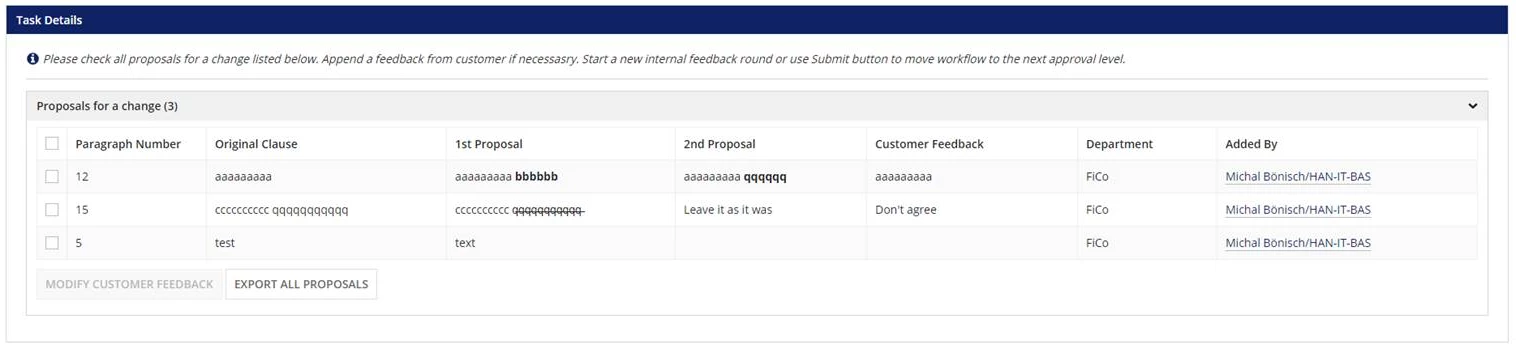
2) Formatted text is added thru the component richTextField from plugin created by Appian, which provides with a simple editor for rich text.

3) Formatted text is saved in DB as HTML text and it is converted to Rich Text display field only for displaying.

4) Customer is requesting the function which exports the data to Excel file and also preservers the formatting.

5) The export process works fine, but Excel does not correctly interpret HTML tags used for formatting. It is imported as a pure text.

This is the process model that I use.

Any advices on how to solve this case?

Thank you,

Michal

7 replies

csteward
Brainy
May 12, 2021

Hi Michal, the functions we have available to export data to Excel are notorious for removing any formatting.  The only node I could suggest to try is unfortunately deprecated - "Export CDT to Excel" as part of the Excel Tools plugin.  You will see around this forum that some of us have still had to apply this node in some situations, since we do not have this exact functionality OOTB.  I'm not positive if it would solve your use case, nor do I know when it will be removed, but I do still have it running in a few production apps on 20.3.

mikes0011
Brainy
May 12, 2021

unfortunately even Export CDT to Excel removed any column formatting.  In the latest version before its deprecation they finally gave the ability to force individual columns to text-wrap, but that's about it.

The Expression Guru
csteward
Brainy
May 12, 2021

Not surprised there.  We have v 2.2.6 of that plugin, believe they went to 2.2.11 or 12.  At least our version doesn't wipe the entire excel formatting, headers, etc..

Otherwise, this could be done in an HTML From Template output, convert to PDF if needed, but unlikely a pretty Excel output can be obtained.

And not to derail, but PS, nice work in the Live Build Challenge!  I did note in that chat when you were missing quotes on line 3 at one point, but not sure if you had a live chat feed ;)