
January 20, 2022
Solved

Correct syntax for inputs when using Execute Stored Procedure in an expression rule

  • January 20, 2022
  • 2 replies
  • 0 views

I need the correct format to create inputs when calling the Execute Stored Procedure plugin from an expression rule.  Here is my entire rule. I want to send an integer as an input (and ri!num is an integer) into a stored procedure and retrieve the results as the dataset is too large for Appian to handle comfortably.

a!localVariables(
  local!spResult: fn!executestoredprocedure(
    dataSourceName: "jdbc/Appian", 
    procedureName: "jsonValTest",
    inputs: {
      id: ri!num
    }
  ),
  local!result: if(
    local!spResult.success,
    local!spResult.result[1],
    local!spResult.error
  ),
  local!result
)


Here is my stored procedure:
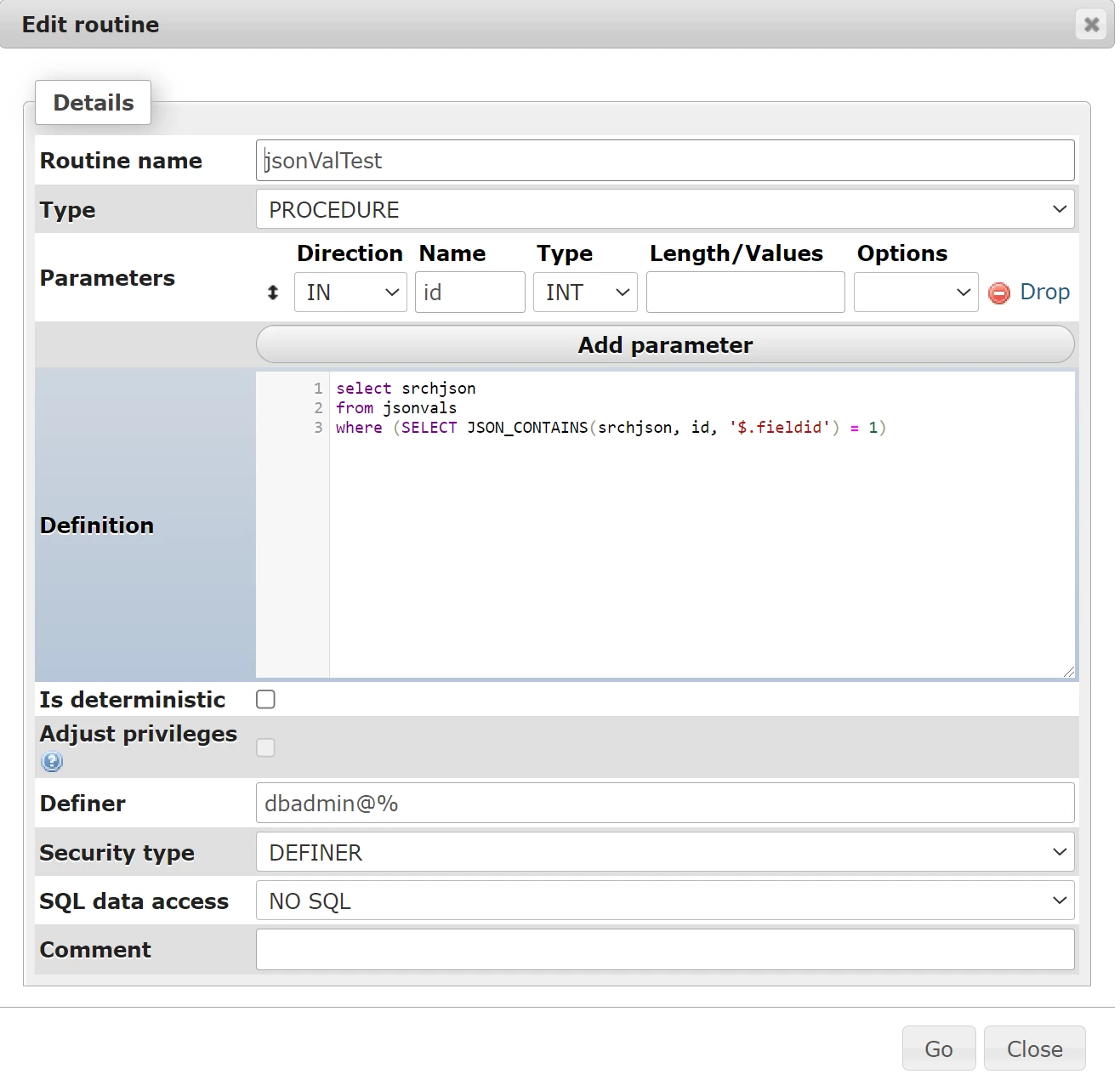
The SQL query when run as a query minus any parameters works. Have I fouled the SQL procedure or do I have the syntax wrong on the execute stored procedure (or both)? Thanks in advance.

Best answer by hrishikeshd997

The syntax to pass the inputs looks incorrect to me -

a!localVariables(
  local!spResult: fn!executestoredprocedure(
    dataSourceName: "jdbc/Appian", 
    procedureName: "jsonValTest",
    inputs: {
        {name: "id", value: ri!num}
    }
  ),
  local!result: if(
    local!spResult.success,
    local!spResult.result[1],
    local!spResult.error
  ),
  local!result
)

Refer to the documentation file of the plugin

community.appian.com/.../execute-stored-procedure

2 replies

January 20, 2022

The syntax to pass the inputs looks incorrect to me -

a!localVariables(
  local!spResult: fn!executestoredprocedure(
    dataSourceName: "jdbc/Appian", 
    procedureName: "jsonValTest",
    inputs: {
        {name: "id", value: ri!num}
    }
  ),
  local!result: if(
    local!spResult.success,
    local!spResult.result[1],
    local!spResult.error
  ),
  local!result
)

Refer to the documentation file of the plugin

community.appian.com/.../execute-stored-procedure

January 20, 2022

Thank you! This formatting worked perfectly for what I need.