June 22, 2022
Solved

Character limit for richtext

  • June 22, 2022
  • 8 replies
  • 0 views

Can we set character limit for rich text field

Best answer by vinayk2390

Since there is no parameter to achieve this, we need to add this as a validation, explore on the options to remove the HTML tags either by using striphtml() or substitute() functions. Problem with using striphtml() is that it converts all tags to newline characters which will add extra characters to our resultset, take this into consideration as we cannot simply wrap substitute() on top to get rid of char(10)s as the actual text may contain them which we are not supposed to exclude.
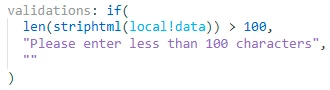
validations: if(
        len(striphtml(local!data)) > 100,
        "Please enter less than 100 characters",
        ""
      )


8 replies

dhananjayk3480
June 22, 2022

Are you talking about this field?

konduruc733182
June 29, 2022

Which Appian version supports the a!richTextField?

harshitb6843
June 29, 2022

Please note - It does not have 'a!' 
It is a custom plug-in that has been provided Appian itself. community.appian.com/.../rich-text-editor

vinayk2390
June 29, 2022

Since there is no parameter to achieve this, we need to add this as a validation, explore on the options to remove the HTML tags either by using striphtml() or substitute() functions. Problem with using striphtml() is that it converts all tags to newline characters which will add extra characters to our resultset, take this into consideration as we cannot simply wrap substitute() on top to get rid of char(10)s as the actual text may contain them which we are not supposed to exclude.

validations: if(
        len(striphtml(local!data)) > 100,
        "Please enter less than 100 characters",
        ""
      )

stefanhelzle0001
Brainy
June 29, 2022

The maxSize parameter restricts the number of characters. Keep in mind that depending on your use case, this might or might not include the HTML formatting.

vinayk2390
June 29, 2022

[mention:126a676c85024855948336691b0a7b92:e9ed411860ed4f2ba0265705b8793d05] As per the documentation, maxSize paramter is based on the size and not the characters, please clarify. Use case here is to base it on character count.

stefanhelzle0001
Brainy
June 29, 2022

In the original post "character limit" is mentioned. As I do not know whether this includes the formatting or not, both options are completely valid.

I had situations in which I just had to make sure that the entered text, including the formatting, fits the size of the field in the database.