sanjuktab2257
August 4, 2025
Solved

Get all Application objects and their respective UUID

  • August 4, 2025
  • 8 replies
  • 0 views

Is there a way to get the list of all application objects we have in Appian via expression rule? I want the create a csv file with all objects and their corresponding UUID.


Best answer by sanjuktab2257

Thank you everyone for your insights. This is how I was able to obtain the UUIDs and respective object name:
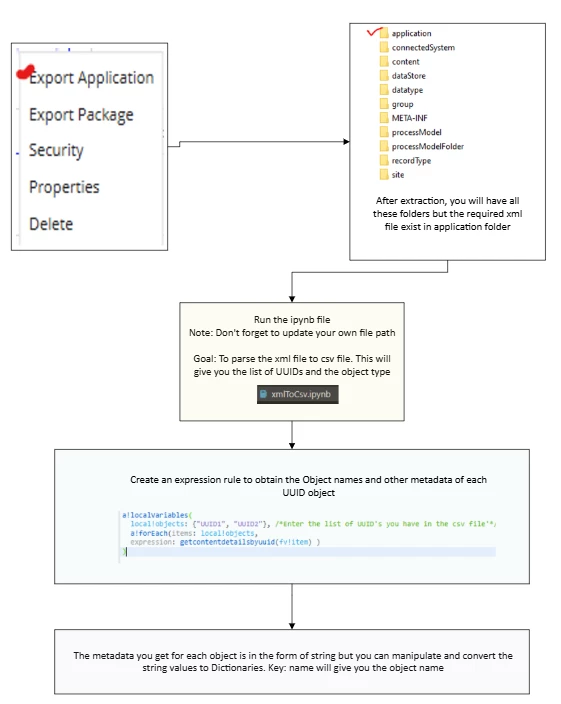
pip install lxml
from lxml import objectify
from lxml import etree
import xml.etree.ElementTree as ET
import pandas as pd

def parse_element(element, item, uuid_map):
    # If the element has no children, store its text
    if len(list(element)) == 0:
        item[element.tag] = element.text
    else:
        # Special handling for  elements with  and 
        if element.tag == "item":
            type_value = None
            uuids = []

            for child in element:
                if child.tag == "type":
                    type_value = child.text
                elif child.tag == "uuids":
                    uuids = [uuid.text for uuid in child.findall("uuid")]

            if type_value and uuids:
                uuid_map[type_value] = uuids

        # Continue recursion
        for child in element:
            parse_element(child, item, uuid_map)
            

tree = etree.parse("xmlfilepath.xml") #Put the path of your xml path
root = tree.getroot()

item = {}
uuid_map = {}

parse_element(root, item, uuid_map)

print("Flat data:", item)
print("UUIDs by type:", uuid_map)

#Create the dataframe:
rows = []
for key, values in uuid_map.items():
    for value in values:
        rows.append({'Key': key, 'Value': value})

df = pd.DataFrame(rows)

#Export the dataframe to csv:
df.to_csv('uatUUID.csv', index = False)

8 replies

mikes0011
Brainy
August 4, 2025

I don't believe there's any automated functionality to handle this.  If it's a one-time need, you could look into exporting everything and then looking at the UUID's contained in the zip file, though it might not be easy to back-translate all UUIDs to the regular readable object names.

stefanhelzle0001
August 4, 2025

What do you want to achieve?

shubhama926776
August 4, 2025

NO built-in expression rule that lists all application objects and their UUIDs in one step.
However, you can achieve this by exporting your application package, unzipping it, and accessing the folder structure - each XML file inside represents an object and contains its UUID. You can then parse these files to extract the UUIDs and object names. Then you can feed this data into a data store and use Export to CSV features in a process model to export reports as CSV files.

Quick Reference Links:
https://docs.appian.com/suite/help/25.2/reference-structure.html
https://community.appian.com/b/appmarket/posts/content-tools

August 5, 2025

It is possible with a plugin function getappobjectuuids(). I'm not sure where the "GetObjects" plugin comes from though, since it pre-dates my current role.

stefanhelzle0001
August 5, 2025

This seems to be a deprecated plugin.

August 5, 2025

Do you have a link to a page for it? I could see it being useful for some automated testing in QA, but it definitely seems like the kind of thing that should not go into production.

sanjuktab2257
sanjuktab2257AuthorAnswer
August 5, 2025

Thank you everyone for your insights. This is how I was able to obtain the UUIDs and respective object name:

pip install lxml
from lxml import objectify
from lxml import etree
import xml.etree.ElementTree as ET
import pandas as pd

def parse_element(element, item, uuid_map):
    # If the element has no children, store its text
    if len(list(element)) == 0:
        item[element.tag] = element.text
    else:
        # Special handling for  elements with  and 
        if element.tag == "item":
            type_value = None
            uuids = []

            for child in element:
                if child.tag == "type":
                    type_value = child.text
                elif child.tag == "uuids":
                    uuids = [uuid.text for uuid in child.findall("uuid")]

            if type_value and uuids:
                uuid_map[type_value] = uuids

        # Continue recursion
        for child in element:
            parse_element(child, item, uuid_map)
            

tree = etree.parse("xmlfilepath.xml") #Put the path of your xml path
root = tree.getroot()

item = {}
uuid_map = {}

parse_element(root, item, uuid_map)

print("Flat data:", item)
print("UUIDs by type:", uuid_map)

#Create the dataframe:
rows = []
for key, values in uuid_map.items():
    for value in values:
        rows.append({'Key': key, 'Value': value})

df = pd.DataFrame(rows)

#Export the dataframe to csv:
df.to_csv('uatUUID.csv', index = False)
