

KB-2070 "Another deployment is already running" when attempting to deploy using the Automated Deployment Manager (ADM)
Symptoms
While inspecting or importing a package using the Automated Deployment Manager (ADM) servlet, the status will remain on "In Progress" indefinitely. This looks like:
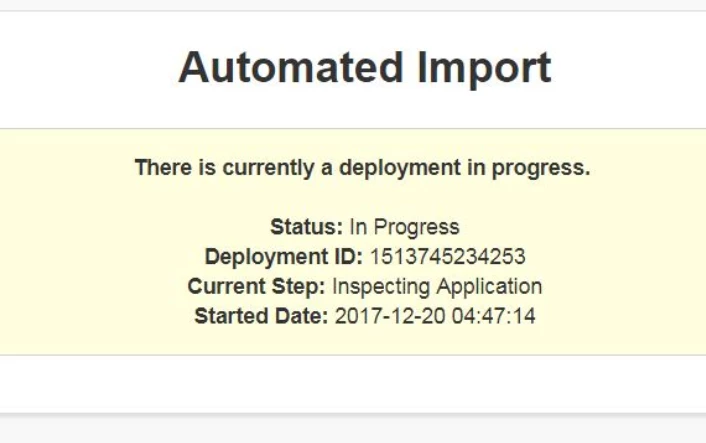
In the application server logs, the following error output will appear:
YYYY-MM-DD HH:MM:SS,sss [ajp-nio-8009-exec-XXX] ERROR com.appiancorp.ps.plugins.automatedimport.DeploymentUtils - Error starting the deployment. Another deployment is already running.

YYYY-MM-DD HH:MM:SS,sss [ajp-nio-8009-exec-XXX] ERROR com.appiancorp.ps.plugins.automatedimport.remote.RemoteDeploymentAutomationServlet - Error while initializing the deployment.
java.lang.IllegalStateException: Error starting the deployment. Another deployment is already running.
        at com.appiancorp.ps.plugins.automatedimport.DeploymentUtils.validateNonConcurrentDeployment(DeploymentUtils.java:409)
        at com.appiancorp.ps.plugins.automatedimport.DeploymentUtils.startDeployment(DeploymentUtils.java:148)
        at com.appiancorp.ps.plugins.automatedimport.remote.RemoteDeploymentAutomationServlet.doPost(RemoteDeploymentAutomationServlet.java:111)
        at javax.servlet.http.HttpServlet.service(HttpServlet.java:660)
        at javax.servlet.http.HttpServlet.service(HttpServlet.java:741)
        at com.atlassian.plugin.servlet.DelegatingPluginServlet.service(DelegatingPluginServlet.java:37)
        at javax.servlet.http.HttpServlet.service(HttpServlet.java:741)
Cause
In the most common instance, this means that an action has been attempted while the ADM is already processing a deployment. It can also be observed after an inspect failure against the deployment package has occurred.
Action
- Check the application server logs to ensure that the behavior is in line with this article and not KB-1445.
- Confirm that any expected deployments have completed. KB-1738 provides steps on how to check if an application import was successful.
- Remove the deployment_progress_file.properties file located in the All Objects > Default Community > Temporary Documents Knowledge Center > Temporary Documents folder.
- Re-attempt the deployment.
Affected Versions
This article applies to all versions of Appian.
Last Reviewed: January 2020